Survey software for research studies
Write questionnaires, or bring them in from a file, and run them in the same study as cognitive tests, images and video, and face and gaze.
Each answer is saved with its time on the session clock, so it lines up with everything else recorded at that moment.
18
question types
with instructions and screen breaks between them
98%
of the questions came over
1,599 of 1,628 questions in 26 public Qualtrics survey files
96%
of the fields came over
19,224 of 20,055 fields in 39 public REDCap data dictionaries
Question types
- Single choice
- Multiple choice
- Image choice
- Preference test
- Click on a picture
- Grid
- Ranking
- Constant sum
- Rating scale
- Slider
- Line scale
- Number
- Yes or no
- Short text
- Long text
- Date
- Time
- File
Every question can be answered with a keyboard, and pictures carry descriptions for screen readers.
A grid can label both ends of each row, for a semantic differential scale: a row reads from its label to its end label, such as Cold to Warm. On a phone each row stacks, its label above the answers and its end label under the last one.
Recommend, 0 to 10 is a ready-made question in the Question type list: one rating of 11 points, numbered 0 to 10, from "Not at all likely" to "Extremely likely" in an English questionnaire. Results shows how many chose each point, as for any rating.
The rating scale, the ranking and the line scale each have a guide, with a question to try. The preference test and the click question have a page of their own.
Pictures and files
- Image choice: a single or multiple choice question whose options are pictures from the study's own images, each with a description for screen readers and an optional label. They stack on a phone and sit side by side on a computer.
- Preference test: an image choice with one answer, of 2 or 3 pictures side by side, stacked on a phone and shuffled for each person unless you turn off Shuffle options. The download keeps the place of the picture chosen, 1 for the left or the top.
- Click on a picture: up to the number of clicks you set, from 1 to 5, on one of the study's pictures. Each click is saved with its place on the picture, its time and the area it hit, from areas you draw. A person who cannot click chooses an area from a list.
- File: a person adds a photo or a PDF file, up to 10 MB each. You choose how many, from 1 to 5.
- A photo is saved again in the browser before it is sent, which removes its location and camera details. The question's small print says so, and says the researchers of the study will see the file.
- Each runs on links, tablets, later visits and in the lab.
The editor
| Section | What you do there |
|---|---|
| Questions | Write each question and its answers, mark it required, and shuffle a choice question's options or a screen's questions for each person. Show an earlier answer in a question's text by writing {{q1|words}}. Tick Check on a single or multiple choice with written options, a rating or a grid row to make it an attention check, and choose the answer a careful person gives. Check-ins and published scales offer no Check. On a grid, tick Label both ends of each row and write its End labels, one per line. |
| Values | Add a value from the link: ?arm=b in the address a participant opens gives arm the value b. Add a worked-out value, with a formula such as if(arm = "b", q1 × 2, q1). Or add a value from the round before: a figure of the panel's ratings in the round before, such as the median of a statement. Rules and placeholders such as {{arm|words}} read them all. A value from the group comes only with a file, and the editor shows it. |
| Lists | Add a list of rows you enter, such as products to rate, each with a text for each field. A new screen can repeat once for each row, in order, or for a number of rows drawn at random for each person, and placeholders such as {{product|this one}} show that row's fields. |
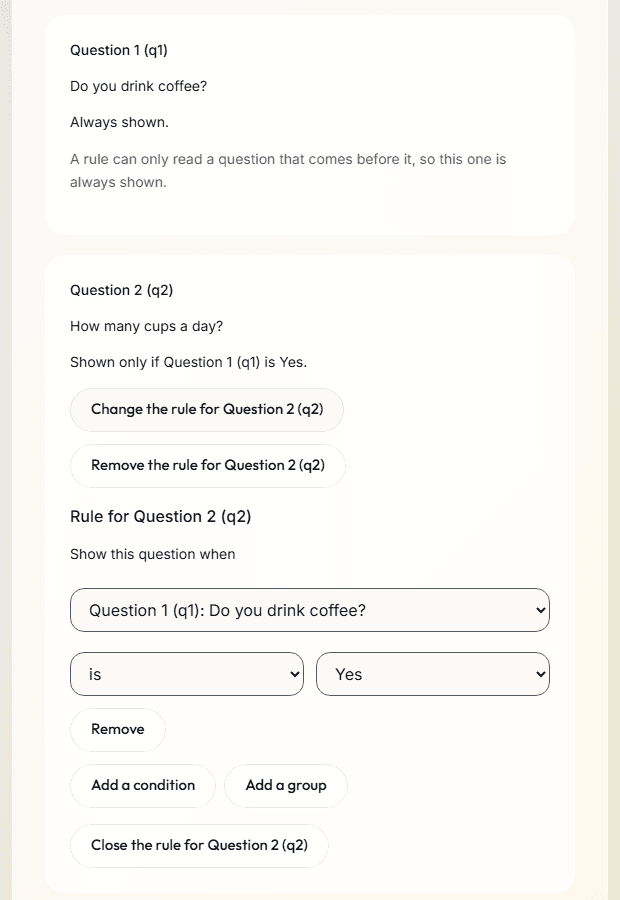
| Logic | Show a question only when earlier answers match, with conditions and groups of conditions. Each rule reads as a sentence, such as "Shown only if Question 1 (q1) is Yes." A rule on a new screen ends the questionnaire early. |
| Scores | Add up or average the answers, turn a question upside down to reverse it, and name bands such as Low and High. Participants never see a score. |
| Languages | Add the questionnaire's text in other languages, each list's rows too, and choose the language each part runs in. A link can let each person choose. A participant's screens and messages come in English, Spanish, French, German, Italian, Japanese, Chinese (Simplified) and Portuguese (Brazil), and text in Arabic, Hebrew or another right-to-left language reads right to left. |
Start from
| Starting point | What you get |
|---|---|
| The library | Scales with the wording their holders published: PHQ-8, GAD-7, SUS, 50-item IPIP Big-Five Factor Markers, TIPI, SWLS, PHQ-2, GAD-2, PHQ-4, PHQ-15 and GDS-15. |
| Sensory presets | Ready-made questions for taste and sensory tests: nine-point liking scale, just-about-right scale and check all that apply. |
| Ready-made checks | Check: instructed answer ("Choose Disagree for this one.") and Check: a fact anyone knows ("How many days are in a week?"), in the Question type list of a study's questionnaires. Each is added as a required single choice with the careful answer already chosen, and in a questionnaire in another language you write its words. |
| A file | A Qualtrics survey file (.qsf) or a REDCap data dictionary. A report shows what came over, what changed and what did not, before anything is added. |
| Your own questions | Write them in the editor, with any of the question types above. |
Answer checks and timers
- A short text question can ask for an email address, or for an answer in a set form, such as a code of P and three digits. A multiple choice can ask for a least and a most number of choices, with options that go alone, such as None of these. A failed check shows its message under the question when the person tries to go on. The editor sets a multiple choice's least and most choices; it has no control for the other checks, and keeps the ones a file brings.
- A screen can wait a number of seconds, up to 600, on the session clock before it shows Continue (Submit answers on the last screen), or move on by itself after them with no Continue. Each showing of a screen starts its timer again. The editor has no control to set a timer, and keeps the ones a file brings.
- A Qualtrics survey file (.qsf) brings email checks, least and most choices, options that go alone, and a timing question's minimum time or auto-advance as its screen's timer. A REDCap data dictionary brings options that go alone, from the @NONEOFTHEABOVE action tag on checkboxes.
- A questionnaire file from ConductExperience (.json), which the editor saves with Download questionnaire (JSON), keeps every check and timer, and is the only one of the three that brings a set form: a pattern of up to 100 characters, in a small part of regular expression syntax. From a file in a questionnaire part opens all three.
Repeats, lists, screens at random and options offered
| Setting or section | What it does |
|---|---|
| Repeat for each | A new screen can repeat once for each option a person chose in an earlier multiple choice, up to 20 times, and a placeholder such as {{fruits|it}} shows that option, as in "How often do you eat Apple?" Each repeat is its own screen with its own answer, and an option that goes alone, such as None of these, never repeats. A screen can also repeat once for each row of a list from the Lists section. |
| N of these at random | N of these at random shows each person some of a new screen and the screens after it, as many as you choose, in a random order, drawn once and kept after a progress save. |
| Options offered | A single choice, a multiple choice or a grid can offer only the options chosen, or not chosen, in an earlier multiple choice: Options offered, or Rows offered for a grid. Its other options, such as None of these, always show, and a question left with none of the options it carries is not shown. |
| Lists | A list holds rows you enter, such as products to rate, each with a text for each field. A new screen can repeat once for each row (Repeat for each), in order, or for a number of rows drawn at random for each person (Each person sees), in a random order and kept after a progress save, up to 20 times. On it, placeholders show that row's texts: with the fields juice and maker, "How do you rate {{juice|it}} by {{maker|its maker}}?" reads "How do you rate Plum by Vale?" |
- A repeated screen holds instructions and single choice, rating scale, slider, line scale, number, short text, long text, date and time questions. It cannot hold another type, such as a multiple choice (so no check all that apply) or a preference test.
- A repeated screen's questions, and a question that offers only some options, cannot be attention checks, and the Scores tab offers no repeated question.
- A rule can read each repeat of a repeated question, such as the repeat for Cherry, but a later question's words cannot show its answers.
- Options offered matches options by their number, not their words. The editor numbers a question's options, and a grid's rows, 1, 2, 3 in the order you add them, so write the later question's options in the same order as the multiple choice's.
In a study, the study builder's Run when and End the study after this part when read a questionnaire's answers, and a section's Each person sees shows each person some of its parts at random.
Rules on the parts of a studyValues from the link, the group, a formula or the round before
- A questionnaire can take values from the link a person opens: ?arm=b gives arm the value b. Rules and placeholders read a value as they read an answer, and the download has a column for each. Up to 10 are kept for each person when they start.
- A worked-out value comes from a formula with + - × ÷, min, max, round and if, such as if(arm = "b", q1 × 2, q1). Its sums use answers that are numbers and number values listed before it, and it reads a value from the link or the group only in an if's condition, like arm here. Rules, placeholders and the download read it as they read a value from the link.
- In the lab, on tablets and in a preview, values from the link are blank.
- A value can hold the name of the person's group, which rules and placeholders read, with a column in the download. It comes with a file: a Qualtrics randomizer that sets a field, or a questionnaire file (.json). The editor shows it and has no button to add one.
- In a study with rounds, a value from the round before holds a figure of a statement's ratings in the round before. It can be this person's rating, the median, the lower or upper quartile, or the percent in a band, such as 7 to 9. Medians and quartiles use R's default method (type 7), which is Excel's QUARTILE.INC. Placeholders show the figures, a percent as a whole number, and rules read them, so a statement at consensus can drop out.
- A value from the round before is blank in round 1, in a preview, in a check-in, and where the round before has no rating to read. A placeholder then shows its own words, such as not rated.
Where it runs
- A study: before, between or after its other parts, or after each image or video.
- A lab computer, a link on the person's own computer or phone, or a tablet in a booth.
- Daily-life check-ins on the person's own phone, with every question type except Click on a picture.
- On a link, the study's first questionnaire can be a screener that turns away people who do not fit, with a quota for each answer of one of its questions.
How it works
- Add a questionnaire part to a study: a scale from the library, your own questions or a file.
- Write its rules, scores and languages, and preview it as a participant.
- Publish the study. People answer one screen at a time and never see a score.
- Download an answers table for each questionnaire, with a data dictionary entry for every column.
What you get in the data
- Each answer, with its time on the session clock.
- The order of a screen's questions each person saw, when they are shuffled, and a mark where a questionnaire ended early.
- A column for each repeat of a repeated question, such as often__1 for the option numbered 1 or taste__3 for row 3 of a list, a column naming the screens each set drew or the rows each list drew, and a row for each draw in subsets.csv.
- The exact questionnaire and its version, saved with the data.
- Each value, from the link, the group, a formula or the round before, in a column after its questionnaire's questions, and each value from the link again in participants.csv, as the link page kept it when the person started.
- Each score, in scores.csv.
- How long each questionnaire page of a session was shown, and how many times the person gave or changed an answer there, in pages.csv.
- Each click on a picture, with its place, its time and the area it hit, in clicks.csv.
- A response is marked when its finish was very fast beside the study's others, and, from a link or a booth, when text was pasted into an answer or the page was left. The download also marks who missed an attention check or gave the same answer throughout, and Results counts them. Nothing is removed, and you decide what to do. participants.csv has a column each for pastes, hidden, fast, checks_missed and same_answers.
- The download counts each place a person gave one answer: in every row of a grid of 5 rows or more, or in 10 rating questions or more in a row. You can change both numbers on the study's page, and a change counts everyone again, the people already in too. Check-ins are not counted. In a study with later visits, sessions.csv has the count for each session.
- Who you excluded from the analysis and why, in participants.csv's excluded and exclusion_reason columns. An excluded person stays in every file.
- The files people add, with a list of them in uploads.csv, or checkin_uploads.csv for check-ins.
- A Results page for each study: the count and share of each answer, the mean, median and a histogram of numbers and sliders, written answers with a search, and each score with its bands, filtered by version, group, status and start date. Excluded people are left out unless you include them, and one line gives the counts for the paper: started, finished, excluded by reason and analyzed.
- Files for SPSS, R and Python: SPSS syntax for each table, with variable and value labels, and readers for R and Python.
- Files for your own REDCap project: a data dictionary and records. Nothing is sent to REDCap.
Limits
- Researcher screens, and a lab session's own screens, are in English. A questionnaire's text can be in any language you add; in a language outside the eight above, the screens around it are in English. You write each translation, and your consent and instructions show in the words you wrote.
- A scale joins the library only when its holder's terms allow it. Any other scale you write or load needs your own right to use it.
- Participants get a link. The product sends them no email.
Related
Open a .qsf survey file
Bring in a survey you built elsewhere, and read the report before anything is added.
Daily-life check-ins
EMA: short questionnaires on the person's phone, at fixed or random times or when something happens.
Study builder
Put questionnaires with tests, images and video, in groups and orders you set, then publish a version.
Online studies
One link for a panel or a mailing list. People answer on their own computer or phone.
Data dictionaries in and out
Questionnaires from a REDCap data dictionary, and files for your own REDCap project.
Data export
An answers table for each questionnaire, a data dictionary, and files for SPSS, R and Python.
Attention checks
Questions with the answer a careful person gives, and the same answer throughout, counted in the download.
Semantic differential scale
A grid with a word at each end of each row, the recommend question, answer checks and page timers.
Skip logic and display logic
Rules on questions and on a study's parts, ending early, repeats, screens at random and options offered, with the data each makes.
Measures
Cognitive tests, face and gaze, and stimuli and events, on the same clock as the answers.
Pricing
Free for pilots and teaching. No charge for each question or answer.
Planning a study?
Start one now, or tell us what you want to measure.