Attention check questions
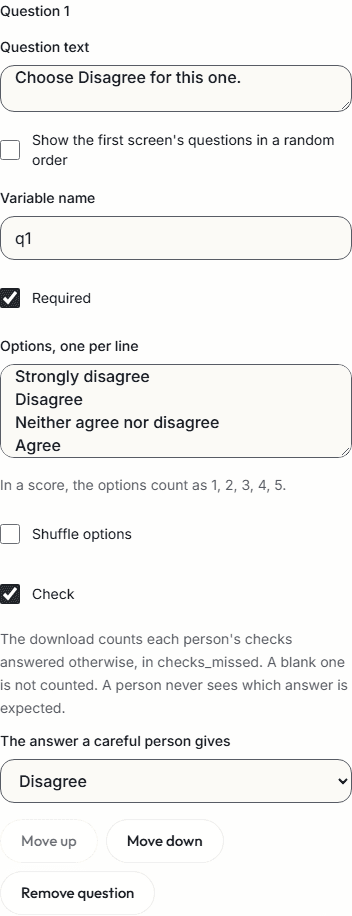
An attention check is a question with one answer that anyone who reads it gives, such as "Choose Disagree for this one." or "How many days are in a week?" A person who answers otherwise may not have read it.
In a ConductExperience study's questionnaires, a single choice, multiple choice, rating or grid row can be a check. The download counts each person's missed checks, and each place they gave one answer throughout. No one is removed, and you decide what to do.
Make a question a check
- A single choice, a multiple choice and a rating have Check. Tick it, and choose the answer a careful person gives: an option, or a point of the rating.
- On a multiple choice, tick the options a careful person chooses. A person misses the check unless they choose exactly those options, in any order.
- A grid has Checks on rows. Choose the answer a careful person gives on any row that is a check, and leave the others at Not a check.
- No other question type offers Check. For a yes or no check, make a single choice with Yes and No.
- A person never sees which answer is expected.
- A check left blank, or hidden by a rule, is not missed.
Ready-made checks
| In the Question type list | What it adds |
|---|---|
| Check: instructed answer | One question that says which answer to choose: Choose Disagree for this one. |
| Check: a fact anyone knows | One question whose answer everyone knows: How many days are in a week? |
Each comes in as a required single choice with its answer set. In a questionnaire in another language, its question and its options' words are left for you to write.
Same answer throughout
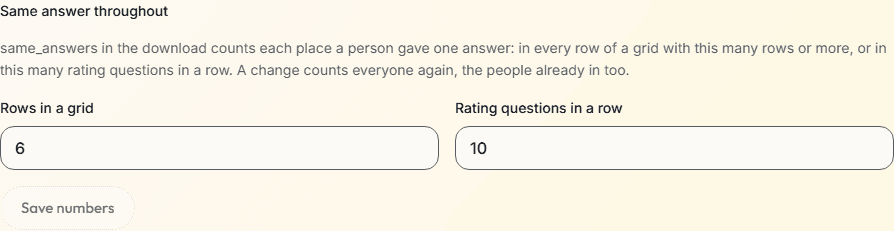
- The download counts each place a person gave one answer: in every row of a grid of 5 rows or more, or in 10 rating questions or more in a row. You can change both numbers on the study's page, and a change counts everyone again, the people already in too. Check-ins are not counted. In a study with later visits, sessions.csv has the count for each session.
- Questions count in the order the person saw them, and one that a rule hid is skipped. Any other question, or a rating with another answer or none, ends a run of ratings. Instructions and screen breaks do not.
- Under Details on the study's page, change Rows in a grid and Rating questions in a row, then choose Save numbers. An editor or an owner can. Both are whole numbers from 2 to 1,000. Duplicate study keeps them.
What Results shows
- When anyone in its filters missed a check or gave the same answer throughout, Results says so: "1 of 12 people has a flag: a very fast finish, pasted text, or leaving the page. 1 of 12 people missed a check, and 1 gave the same answer throughout. They stay in the data, and the download marks them."
- Participants does not list who missed a check. Find them in participants.csv, then choose Exclude and Another reason, such as Missed a check. Excluded people are left out unless you include them, and one line gives the counts for the paper: started, finished, excluded by reason and analyzed.
What the download holds
participants.csv has a column for each count, in the data dictionary's words:
| Column | What it holds |
|---|---|
| checks_missed | How many checks the person answered otherwise than a careful person would: questions or grid rows marked Check in the questionnaire. One that rules hid, or that was left blank, is not missed. In a study with later visits, the first visit's. Worked out when the data is downloaded. |
| same_answers | How many times the person gave one answer throughout: in every row of a grid of 5 rows or more, or in 10 rating questions or more in a row. In a study with later visits, the first visit's. Worked out when the data is downloaded. You can change both numbers on the study's page. |
checks_missed is blank, not 0, for a person who answered no questionnaire with a check, and same_answers for a person who answered no questionnaire.
How to build one
- Add a questionnaire part to a study, then a Single choice, Multiple choice, Rating scale or Grid from the Question type list, or one of its ready-made checks.
- Tick Check and choose the answer a careful person gives, or on a grid, choose it on each row that is a check.
- Open the Check tab, preview the study as a participant, and publish it.
- When people have finished, read Results and download the data.
Limits
- Checks are for a study's sessions. A check-in's questions cannot be checks.
- In a study with later visits, participants.csv and Results count the first visit's session, and sessions.csv has both counts for each session.
- An image choice, a preference test, a published scale from the library, a question on a repeated screen and a question that offers only some options offer no Check.
- Files for REDCap keep the answers and do not mark a missed check.
Related
Survey software
Every question type of the questionnaire editor, with rules, scores and languages.
Data export
Every table of a study, with a data dictionary entry for every column.
Online studies
One link for a panel or a mailing list, with a completion code at the end.
Screener surveys
How to write screener questions, with rules and quotas.
Planning a study?
Start one now, or tell us what you want to measure.