Sensory testing on tablets in booths
Run sensory evaluation on tablets in booths. Each sample has a three-digit code, each person gets a balanced serving order, and staff start each participant with a PIN.
Ask liking, just-about-right and check-all-that-apply questions after each sample, and download every answer with its sample code.
633
codes the draw can give
three different digits, never a run such as 123
12
samples in a balanced order
the most a counterbalanced section takes
3
sensory presets
nine-point liking scale, just-about-right scale and check all that apply
Sample codes
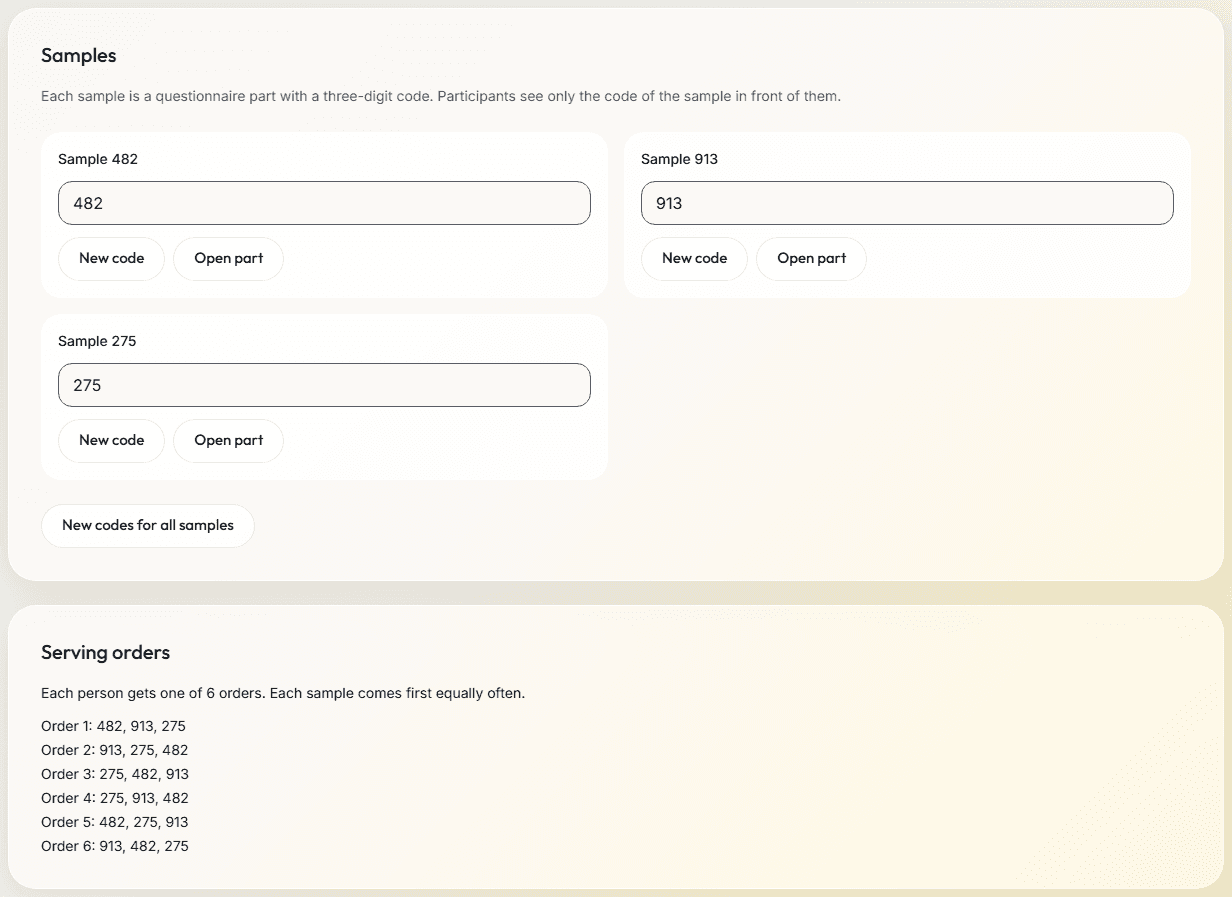
- Each sample is a questionnaire part with a three-digit code, from 100 to 999. Participants see only the code of the sample in front of them.
- New code draws one of 633 codes with three different digits that do not run in order, such as 482. A code you type that repeats a digit or runs in order, such as 112 or 123, gets a warning.
- Two samples cannot share a code in one study.
- Staff and participants see only codes. You decide what each code stands for.
Serving orders
- Put the samples in a counterbalanced section, and each person gets one order of a Williams Latin square, for 2 to 12 samples: as many orders as samples for an even number, twice as many for an odd number.
- Each sample comes in each position, and after every other sample, equally often, which balances first-order carryover.
- The next person gets the order used least so far, across every tablet in the study.
- A fixed order gets a warning, and a shuffled order is random for each person.
- A section can instead show each person some of its parts, drawn at random and not balanced across people. The serving sheet, realized_sequence and sample_codes then list only the samples drawn.
At the booth
- Make a booth link for each tablet, with a staff PIN of 4 to 8 digits. Its name, such as Booth 3, is saved with each participant's data.
- Staff type the PIN. The serving sheet shows the participant code and the sample codes in that person's order, such as: Serve 275, then 482, then 913.
- Staff hand over the tablet. The person sees the code of each sample, tastes it and answers its questions, with a break to rinse between samples when you add one.
- At the end the tablet thanks the person, and after 20 seconds it is ready for the next participant.
The staff PIN
- Staff start each participant on the tablet with the PIN. A participant cannot start themselves.
- The PIN is stored only as a hash, never as the PIN itself.
- Too many wrong PINs lock the link for a while, so give each tablet its own link: one booth cannot lock the others out.
Questions for each sample
| Preset | What it asks |
|---|---|
| Nine-point liking scale | One question with nine points, from dislike extremely to like extremely. |
| Just-about-right scale | One question with five points, from much too little to much too much. Name the attribute in the question. |
| Check all that apply | A list of terms. A participant picks any number of them, and sees them in an order of their own. |
The nine-point hedonic (liking) scale is the preset Nine-point liking scale: one question with nine points, from dislike extremely to like extremely. The labels are in English; in another language, you write them.
Any other question type works after a sample too, such as a ranking of the samples by their codes, a grid, a line scale or a slider.
The Tasting template
- Compare samples that people taste, such as foods or drinks, on a tablet in a booth.
- Instructions, then three samples in a counterbalanced order with a rinse break between them. After each sample: a liking scale, a flavor scale and a list of words to tick. The camera is off.
- You write the words to tick, and you decide what each code stands for.
If the network drops
- A finished session is saved on the tablet, then sent. If sending fails, the person is told the answers are saved on the tablet, and it sends them when the network is back.
- Starting a participant needs the network.
What you get in the data
- participants.csv: how each person started, the booth's name, their serving order and the sample codes in the order served.
- The sample code on each row of the answers tables, so answers group by sample.
- A column of 0 and 1 for each word of a check-all-that-apply question.
- Files for SPSS, R and Python, with every export.
Limits
- There are no discrimination tests, such as triangle, duo-trio or tetrad tests.
- The Results page counts the answers of all samples together. Split them by sample code in the export.
- A tablet that reloads in the middle of a session starts that session again. A booth runs a person's first visit only.
Related
Study builder
The parts, groups, orders and versions of a tasting, and the Samples tab.
Survey software
Every question type, rule and score you can ask after a sample.
Online studies
Send a link for home-use tests. People take part on their own computer or phone.
Longitudinal studies
Later visits inside windows you set, each person with a private return link.
Three-digit numbers
Draw sample codes that do not stand out to a taster.
Counterbalancing
Balanced serving orders, with a generator.
Planning a study?
Start one now, or tell us what you want to measure.