Bring a data dictionary in, and records out
Load a REDCap data dictionary (.csv), and each form becomes a questionnaire you can run with tests, images and video. A report shows what came over, what changed and what did not, before anything is added.
When the study is done, the export can hold files for your own REDCap project: a data dictionary and the records. Nothing is sent to REDCap.
96%
of the fields came over
19,224 of 20,055 fields in 39 public REDCap data dictionaries
Of the 19,224 fields, 16,585 came over unchanged, 2,613 with changes the report names and 26 as scores. 831 were left out.
What comes over
| In the data dictionary | In ConductExperience |
|---|---|
| Text | A short text question, or a number, date, time or date-and-time question when the field checks for one. |
| Notes | A long text question. |
| Yes or no, true or false | A yes or no question. |
| Radio buttons and drop-down lists | A single choice question. |
| Checkboxes | A multiple choice question. |
| The @NONEOFTHEABOVE action tag on checkboxes | Choices that go alone: each choice it names can only be chosen on its own. |
| Slider | A slider. |
| File upload | A file question, which takes a photo or a PDF file. A signature field is left out. |
| Piping of an earlier field in the form | Piped text that shows that field's answer. |
| Descriptive text | Instructions. |
| Section headers | A new screen. |
| Matrix groups | A grid, with the same rows and answers. |
| Branching logic | A rule, when the reader can read it. Otherwise the field shows to everyone, and a note names the rule. |
| Calculated fields | A score, when the field adds up or averages answers. Other calculations are left out, with their formula in a note. |
What is left out
- Identifier and contact fields, such as email, phone, postal code, record number and social security number, and the record ID.
- Hidden fields, signature and SQL fields.
- Other answer checks, other piping and action tags, each named in a note.
How it works
- Download the .csv from your REDCap project's Data Dictionary page.
- Start a study and choose Open a data dictionary (.csv). In a study you have, choose From a file in a questionnaire part and pick the .csv.
- Read the report: what came over, what changed and what did not. Choose a form, then make a study from it or add it to the part. Each form becomes one questionnaire.
- Edit it like any other questionnaire, with rules, scores and languages, and run it with tests, images and video.
Records out
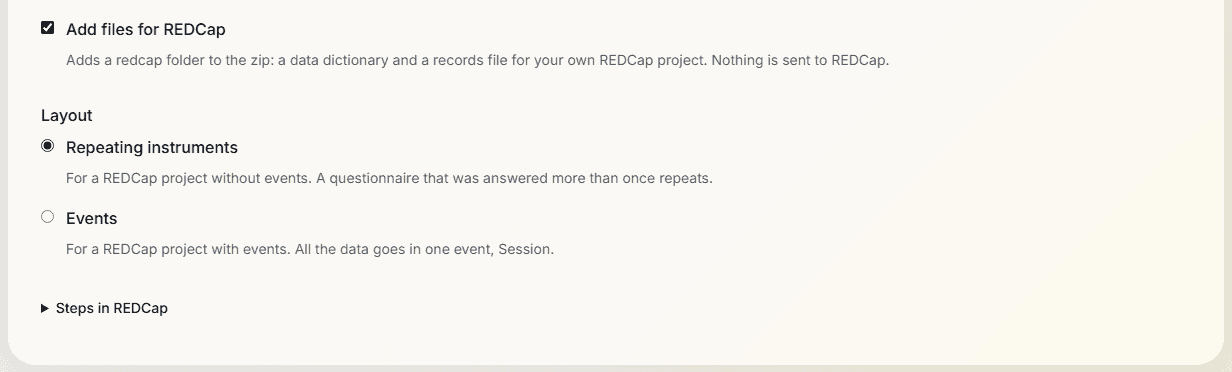
- On the Data screen, choose Add files for REDCap and a layout: Repeating instruments, for a project without events, where a questionnaire answered more than once repeats; or Events, for a project with events, where all the data goes in one event, Session.
- The redcap/ folder holds data_dictionary.csv, records.csv, mapping.csv with the answer codes, notes.csv and README.txt. The Events layout adds events.csv and instrument_event_mapping.csv.
- Its forms are the participant, the session and one for each questionnaire. Answers and scores go in, except a click question's clicks and a preference test's side. Those stay in the main export with tests, events and face data.
- A value from the link is a text field before the questions, with REDCap's @HIDDEN-SURVEY action tag, and the records hold each person's value. The rules and piped text that read it come over, but nothing fills the field in a REDCap survey unless you do, so until then a rule there finds it blank. A worked-out value is a field after the questions, with its value in the records. REDCap does not work it out.
- A repeated screen is written out once for each option it repeats for, each field named by the question and the option, such as often_1 for the column often__1, and shown only when that option was chosen, with the option's words in its text: How often do you eat Apple? Every screen of a set drawn at random is in the form, and a question that offers only some options offers all of them; notes.csv says so. A value from the group is a text field before the questions, with the same action tag as a value from the link, and the records hold each person's group. As with a value from the link, nothing fills it in a REDCap survey unless you do, so until then a rule there finds it blank.
- A screen that repeats for each row of a list is written out once for each row, such as taste_3 for the column taste__3, with that row's texts in place of its placeholders: How do you rate Plum by Vale? A list that shows each person some of its rows is asked in full; notes.csv says so. The rows drawn for each person, in their order, stay in the main export: the list's column and subsets.csv.
- A value from the round before is a text field before the questions, validated as a number, with the same action tag, and the records hold the figure each person was given. As with a value from the link, nothing fills it in a REDCap survey unless you do, so until then a rule there finds it blank.
- Before the export finishes, the files are read back with the same reader that brings data dictionaries in. If they do not match, the export stops.
- Nothing is sent to REDCap. You upload the files to your own project.
Limits
- An upload replaces a REDCap project's whole data dictionary, and removes the data of fields the file does not hold. Upload the files to an empty project.
- A score here is empty unless every answer it adds up was shown and given.
- The reader takes a comma-separated file of up to 50,000 rows and 200 columns.
Related
Survey software
The question types, rules, scores and languages a data dictionary's forms become.
Open a .qsf survey file
Bring in a survey you built elsewhere, and read the report before anything is added.
Data export
Every table of a study, with a data dictionary of its own and files for SPSS, R and Python.
Study builder
Put the questionnaires with tests, images and video, in groups and orders you set.
Planning a study?
Start one now, or tell us what you want to measure.