Semantic differential scale
A semantic differential scale asks where something sits between two opposite words, such as Cold and Warm. Each pair is a row, with a word at each end and the answers between them.
In a ConductExperience questionnaire it is a grid that labels both ends of each row. The same questionnaire can ask how likely a person is to recommend something on a rating from 0 to 10, check answers before the person goes on, and hold a screen for a number of seconds.
A semantic differential example
"How does the drink seem?", with three rows and 7 answers in each:
| Label | Answers | End label |
|---|---|---|
| Cold | 1 2 3 4 5 6 7 | Warm |
| Bitter | 1 2 3 4 5 6 7 | Sweet |
| Thin | 1 2 3 4 5 6 7 | Full |
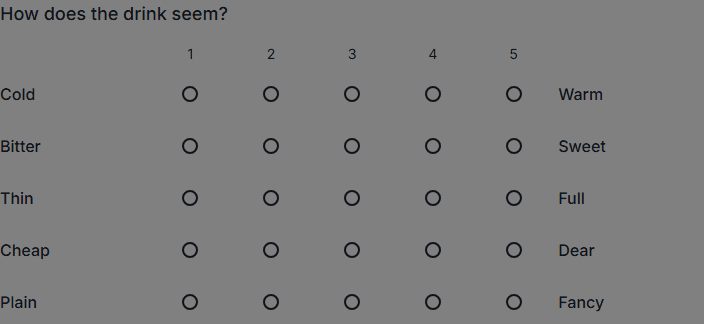
How a row reads
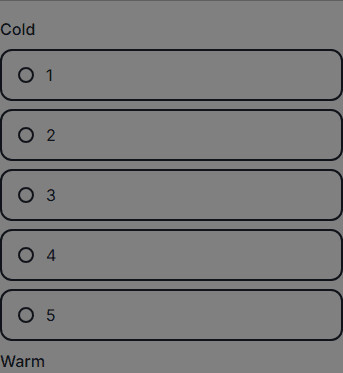
- A grid can label both ends of each row, for a semantic differential scale: a row reads from its label to its end label, such as Cold to Warm. On a phone each row stacks, its label above the answers and its end label under the last one.
- On a computer each row reads along one line, from its label through its answers to its end label, when the answers fit across the screen. A grid with more answers than fit, such as a 9-point form, stacks as on a phone.
- A screen reader names a row's answers by its label and its end label, such as "Cold Warm". When the question shows "Choose an answer in every row.", a row left blank is also named "Not answered".
Semantic differential or Likert scale
A Likert scale asks how much a person agrees with each statement, and every row has the same answers, such as Disagree to Agree. A semantic differential scale asks where something sits between two opposite words, and each row has its own pair. In the questionnaire editor a Likert scale of several statements is a grid, and Label both ends of each row makes a grid a semantic differential.
Likert scale questionsA 7-point semantic differential scale
- A 7-point semantic differential scale has 7 answers between the two words of each row, as in the example. Write them under Answers, one per line, such as 1 to 7.
- A grid takes up to 300 answers, the same in every row, so a 5-point or a 9-point form is built the same way.
What the download holds
- Each row is a column of its own, such as feel__1 for the first row of a question whose variable name is feel, and holds the code of the answer chosen. data_dictionary.csv names the column by the question and both ends, such as "How does the drink seem?: Cold to Warm", and gives each code's answer.
What Results shows
- Results names each row by both its labels, such as Cold to Warm, with how many people answered it and the count and share of each answer.
The recommend question
- Recommend, 0 to 10 is a ready-made question in the Question type list: one rating of 11 points, numbered 0 to 10, from "Not at all likely" to "Extremely likely" in an English questionnaire. Results shows how many chose each point, as for any rating.
- Write what is recommended in the question, such as "How likely are you to recommend the drink to a friend?" In a questionnaire in another language, you write its end labels too.
- Results labels its first and last points "0 (Not at all likely)" and "10 (Extremely likely)". The download holds the point chosen, from 0 to 10, and data_dictionary.csv gives "0=Not at all likely | 10=Extremely likely".
Answer checks
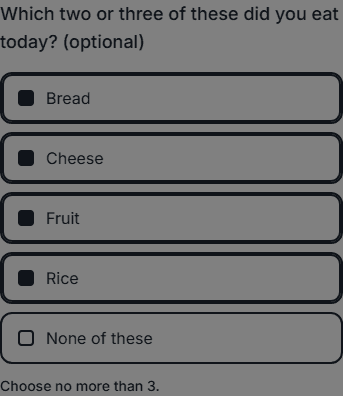
A short text question can ask for an email address, or for an answer in a set form, such as a code of P and three digits. A multiple choice can ask for a least and a most number of choices, with options that go alone, such as None of these. A failed check shows its message under the question when the person tries to go on. The editor sets a multiple choice's least and most choices; it has no control for the other checks, and keeps the ones a file brings.
| Check | Message the person sees |
|---|---|
| An email address | Enter an email address, such as name@example.com. |
| A set form, such as P and three digits | Enter your answer in the format asked for. |
| At least 2 choices | Choose at least 2. |
| No more than 3 choices | Choose no more than 3. |
- The message shows under the question, and a screen reader reads it out as it shows. It goes once the person changes that answer.
- Choosing an option that goes alone clears the others, and choosing another option clears it. In a shuffled list it keeps its place.
- An option that goes alone is a whole answer on its own, even when a least number of choices is set.
- An optional question left blank is not checked.
Page timers
- A screen can wait a number of seconds, up to 600, on the session clock before it shows Continue (Submit answers on the last screen), or move on by itself after them with no Continue. Each showing of a screen starts its timer again. The editor has no control to set a timer, and keeps the ones a file brings.
- When the button shows, a screen reader hears "You can continue now.", or "You can submit your answers now." on the last screen.
- On a screen that moves on by itself, no question needs an answer, and an answer that fails its check is dropped as the screen goes.
How to build one
- Add a questionnaire part to a study, choose Grid in the Question type list, and press Add a question.
- Write the Question text, then the Rows, one per line, with the word at the start of each row, such as Cold.
- Tick Label both ends of each row, and write the End labels, one per line, one for each row, such as Warm.
- Write the Answers, one per line, such as 1 to 7.
- For the recommend question, choose Recommend, 0 to 10 in the Question type list instead, and name what is recommended in its Question text.
- Open the Check tab, preview the study as a participant, and publish it.
Limits
- Apart from a multiple choice's least and most choices, the editor has no control to set answer checks or page timers. They come from a file, and the editor keeps them.
- A Qualtrics survey file (.qsf) brings email checks, least and most choices, options that go alone, and a timing question's minimum time or auto-advance as its screen's timer. A REDCap data dictionary brings options that go alone, from the @NONEOFTHEABOVE action tag on checkboxes.
- A questionnaire file from ConductExperience (.json), which the editor saves with Download questionnaire (JSON), keeps every check and timer, and is the only one of the three that brings a set form: a pattern of up to 100 characters, in a small part of regular expression syntax. From a file in a questionnaire part opens all three.
Related
Likert scale
Rating scales and grids of statements, with a question to try.
Survey software
Every question type of the questionnaire editor, with rules and languages.
Attention checks
Questions with the answer a careful person gives, counted in the download.
Open a .qsf survey file
Bring in a survey you built elsewhere, and read the report before anything is added.
Planning a study?
Start one now, or tell us what you want to measure.