Your data, in files you can read
Download a study as one zip of tables: a row for each person, an answers table for each questionnaire, a table for each test, and every event on the session clock. A data dictionary describes every column.
The export comes with files for SPSS, R and Python, and a script can read the same tables through the ConductExperience API with a key.
1,000
people in one export
with up to 600 MB of session files
15
API routes
every one of them a read
60
API calls a minute
4 at once
What the export holds
| File | What it holds | When |
|---|---|---|
| participants.csv | one row for each person | In every export |
| parts.csv | the parts of each version | In every export |
| stimuli.csv | each image and video | In every export |
| events.csv | every event on the session clock | In every export |
| part_windows.csv | when each part began and ended | In every export |
| scores.csv | questionnaire and test scores | In every export |
| questionnaires/ | an answers table for each questionnaire | In every export |
| pages.csv | a row for each time a person was on a questionnaire page, with how long the page was shown and how many times they gave or changed an answer, but none for the page a person left the study on | in a study whose sessions ask a questionnaire |
| clicks.csv | a row for each click of a click question, with its place on the picture, its time and the area it hit | in a study whose sessions ask a click question |
| subsets.csv | a row for each draw a person had: the screens a questionnaire's set drew or the rows its list drew, in the order shown, or the parts a section drew | in a study with a set of screens at random, a screen that repeats for rows of a list drawn at random, or a section that draws its parts |
| tests/ | a table for each test | In every export |
| face/ | face and gaze samples | unless you leave them out |
| stimuli/ | the study's own images and videos | when you ask for them |
| redcap/ | files for your own REDCap project | when you ask for them |
| uploads.csv | each file people added to a file question, with its type and size | in a study with file questions |
| uploads/ | the files people added | in a study with file questions, up to the export's limit |
| visits.csv, sessions.csv | each visit and its session | in a study with visits |
| checkins.csv | a row for every check-in, planned or started | in a study with check-ins |
| checkin_attempts.csv | every reminder sent | in a study with check-ins, unless you leave it out |
| checkin_answers/ | the answers to each check-in questionnaire | in a study with check-ins |
| checkin_uploads.csv | each file people added to a check-in's file question, with its type and size | in a study whose check-ins ask file questions |
| checkins/ | the files people added to check-ins, in a folder for each person | in a study whose check-ins ask file questions |
| daily_people.csv | a check-in summary for each person | in a study with check-ins |
| data_dictionary.csv | a row for every column | In every export |
| analysis/ | SPSS syntax, and readers for R and Python | In every export |
| study/ | each version of the study, as it was published | In every export |
| export.json | a checksum for every file | In every export |
Attention checks and same answers
Beside pastes, hidden and fast, participants.csv has these two columns, in the data dictionary's words:
| Column | What it holds |
|---|---|
| checks_missed | How many checks the person answered otherwise than a careful person would: questions or grid rows marked Check in the questionnaire. One that rules hid, or that was left blank, is not missed. In a study with later visits, the first visit's. Worked out when the data is downloaded. |
| same_answers | How many times the person gave one answer throughout: in every row of a grid of 5 rows or more, or in 10 rating questions or more in a row. In a study with later visits, the first visit's. Worked out when the data is downloaded. You can change both numbers on the study's page. |
In a study with visits, sessions.csv has both columns for each visit's session:
| Column in sessions.csv | What it holds |
|---|---|
| checks_missed | How many checks the person answered otherwise than a careful person would in this session: questions or grid rows marked Check in the questionnaire. One that rules hid, or that was left blank, is not missed. Worked out when the data is downloaded. |
| same_answers | How many times the person gave one answer throughout in this session: in every row of a grid of 5 rows or more, or in 10 rating questions or more in a row. Worked out when the data is downloaded. You can change both numbers on the study's page. |
Values from the link, the group, a formula or the round before
participants.csv has a column for each value the study takes from the link, named link_ and the value's name, sorted by name, after its own columns and before the panel's: the value the link page kept when the person started. Each answers table, a check-in's too, has a column for each value after its questions, under the value's own name. For a value from the link named arm, a worked-out value total, a value from the group named cohort and a value from the round before named q1_median, the data dictionary says:
| Column of a value | What it holds | A blank cell means |
|---|---|---|
| link_arm in participants.csv | A value from the link the person opened: arm (?arm=), as the link page kept it when they started. | The link did not carry it, or the link page could not keep it. |
| arm in an answers table | From the link: ?arm= | The link did not carry this value, or the link page could not keep it. |
| total in an answers table | Worked out: q1 + q2 | An answer the value reads is missing. |
| cohort in an answers table | The person's group | The person has no group. |
| q1_median in an answers table | From the round before: the median of q1 | Not rated last round, or this is the first round. |
In a study with rounds, an answers table has a row for each round a person took, named in its visit columns, and a value from the round before holds the figure the person was given for that round: round 2's rows hold round 1's figures, frozen when you closed round 1, and round 1's rows are blank. Each closed round's figures, the last round's too, are in the round report on the Participants page.
Repeats, lists, options offered and draws
A repeated question has a column for each option it can repeat for, or each row of a list, named by the question and the option's or the row's number. A cell is blank for an option the person did not choose or a row not drawn for them. A set of screens drawn at random, or a list a screen repeats for that shows each person some of its rows, adds a column that names the screens or rows drawn. A question that offers only some options keeps its own columns, and a cell is also blank where the earlier answer it carries from left that option out. A check-in's answers table has the same columns. For a questionnaire whose question often repeats for each fruit chosen in fruits, whose question best offers only the fruits chosen, and whose set stimuli shows each person 1 of 2 screens, the data dictionary says:
| Column in an answers table | What it holds | A blank cell means |
|---|---|---|
| often__1 | How often do you eat {{fruits|it}}?: Apple | The option was not chosen, so the screen did not repeat for it; or it was not answered, hidden by a rule, or the questionnaire was ended early. |
| best | Which do you like best? (offers the options chosen in fruits) | Not offered, since the earlier answer it carries from left it out; or not answered, hidden by a rule, or the questionnaire was ended early. |
| stimuli | 1 of these at random: the screens drawn for this person, by the page break that starts each, in the order shown. | The answers hold no valid draw of this set. |
For a questionnaire whose list juices shows each person 2 of its 3 rows at random, and whose question taste repeats for each juice drawn, the data dictionary says, naming each row by its first field:
| Column for a list | What it holds | A blank cell means |
|---|---|---|
| juices | 2 of these rows at random: the rows of the list juices drawn for this person, in the order shown. | The answers hold no valid draw of this list. |
| taste__3 | How do you rate {{juice|it}} by {{maker|its maker}}?: Plum | The row was not drawn for this person, so the screen did not repeat for it; or it was not answered, hidden by a rule, or the questionnaire was ended early. |
subsets.csv has a row for each draw in a person's sessions: each section that showed them some of its parts, and each set of screens or list a questionnaire drew. After participant_code and participant_status, its columns are:
| Column in subsets.csv | What it holds | A blank cell means |
|---|---|---|
| step_id | The part that asked the questionnaire. It is a row of parts.csv. | The row is a section's draw of its parts, or the questionnaire was not asked by a study part. |
| questionnaire_id | The questionnaire that holds the set or the list, by its ID in the version. A part's follow-up questionnaires share its step ID; this tells their sets and lists apart. | The row is a section's draw of its parts. |
| set | A questionnaire's random set of screens, by the set's key; a list that shows each person some of its rows, by the list's key; or a section that shows some of its parts at random, by the section's ID. | Never blank. |
| drawn | What was drawn for the person, joined by ;. For a set of screens, the page break that starts each group of screens drawn, in the order the person saw them. For a list, the name of each row drawn, in the order the person saw them. For a section, the step ID of each part drawn, in the section's order; each is a row of parts.csv. | Never blank. |
The data dictionary
data_dictionary.csv is the study's codebook: it has a row for every column of every table, with these columns:
| Column | What it says |
|---|---|
| file | The table the column is in. |
| column | The column's name. |
| type | What it holds, such as text, a whole number, a day, a time, or true or false. |
| unit | Its unit, such as ms, seconds or degrees of visual angle. |
| allowed_values | The values it can take. |
| meaning | What it means, in a sentence. |
| blank_means | What an empty cell means, such as "The camera was off." |
Files for analysis
Every export has an analysis/ folder for SPSS, R and Python, written from its own data dictionary:
- An SPSS syntax file for each table, with variable labels, value labels and missing values.
- read_study.R, in base R, and read_study.py, with Python's standard library, or DataFrames when pandas is installed.
- They pair columns by name, and stop with a plain message when a table and its dictionary disagree.
- SPSS reads a line as a row, so it reads its own copies of the tables whose written answers hold line breaks, with each break made a space. The main tables keep their line breaks.
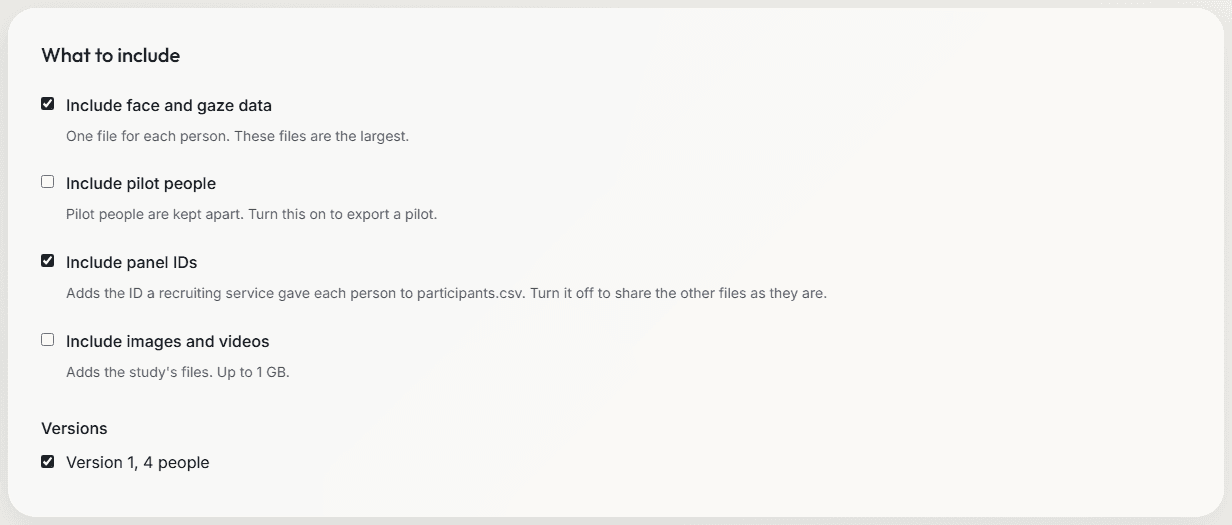
What you choose to include
| Choice on the Data screen | Starts | What it adds |
|---|---|---|
| Include face and gaze data | On | The face/ folder, one file for each person. |
| Include panel IDs | On | Each panel's participant ID, in participants.csv. |
| Include images and videos | Off | The study's own images and videos, in stimuli/. |
| Include pilot people | Off | The people from pilot links and pilot lab sessions. |
| Include send attempts | On | Every reminder sent, in a study with check-ins. |
| Add files for REDCap | Off | The redcap/ folder, in the layout you choose. |
Checks on the files
- export.json holds a checksum for every other file, and the versions of the code that made them.
- Text that a spreadsheet would run as a formula stays text.
- A person whose files cannot be read is left out, with a line that names them.
- study/ holds each version of the study as it was published, so the data names the exact design each person ran.
The ConductExperience API
- Make a key on the Integrations page, for all your studies or up to 100 of them.
- A key lasts 1, 3 or 6 months, 1 year or 2 years, and you can have 10 in use. You can revoke a key at any time.
- Up to 60 calls a minute and 4 at once. A table comes in pages of up to 500 people.
- Every table is byte for byte the export's table. The API reads your data and never changes it.
- The Integrations guide has an example script in Python, with the standard library only.
| Route, under /api/v1 | What it gives |
|---|---|
| GET /openapi.json | Describe this API |
| GET /me | Describe this key |
| GET /studies | List studies |
| GET /studies/{id} | Get a study |
| GET /studies/{id}/versions/{n} | Get a published version |
| GET /studies/{id}/participants | List the people in a study |
| GET /studies/{id}/participants/{code}/plan | Get a person's check-in plan |
| GET /studies/{id}/sessions | List session files |
| GET /studies/{id}/sessions/{session} | Summarize a session file |
| GET /studies/{id}/sessions/{session}/file | Get a link to a whole session file |
| GET /studies/{id}/checkins | List check-ins |
| GET /studies/{id}/checkins/{code}/{occurrence}/answers | Get the answers to one check-in |
| GET /studies/{id}/tables | List the data tables of a study |
| GET /studies/{id}/tables/{name} | Get a data table |
| GET /studies/{id}/exports | List earlier exports |
Where your data is kept
- Study data is kept in Microsoft Azure in the United States, in the account of the researcher who made the study.
- Only the people on the study's team can open it, each with the role you give them.
- Video never leaves the computer that runs a session. Only the face and gaze measures are saved.
- A study or session you delete is kept for 7 days in case of a mistake, then removed. Deleting a study removes its people's check-in data too. Backup copies of deleted data are removed within 30 days.
Limits
- One export holds up to 1,000 people, 600 MB of session files and 1,024 MB of images and videos.
- When the files people added come to more than 1,024 MB, the export keeps every table, leaves the files out and says so. They stay in your account's storage.
- The API has no events, face or subsets table. Download the export for those.
Related
Data dictionaries in and out
Questionnaires from a REDCap data dictionary, and files for your own REDCap project.
Study builder
The parts, groups, orders and versions behind every table.
Survey software
The question types, rules and scores whose answers fill the answers tables.
Daily-life check-ins
EMA on the person's phone, with a row in the export for every check-in.
Planning a study?
Start one now, or tell us what you want to measure.