Bring people back for later visits
Run a longitudinal study as a series of visits: a first session, then later ones inside windows you set, such as a week and a month later. Each visit runs the sections you choose.
People who started by link keep a private return link with their dates. One table follows every visit of every person, and the export lines each session up with its visit for repeated measures.
24
visits in a study
the first visit and the later ones
10 years
the latest a visit can open
day 3,650 after the first visit
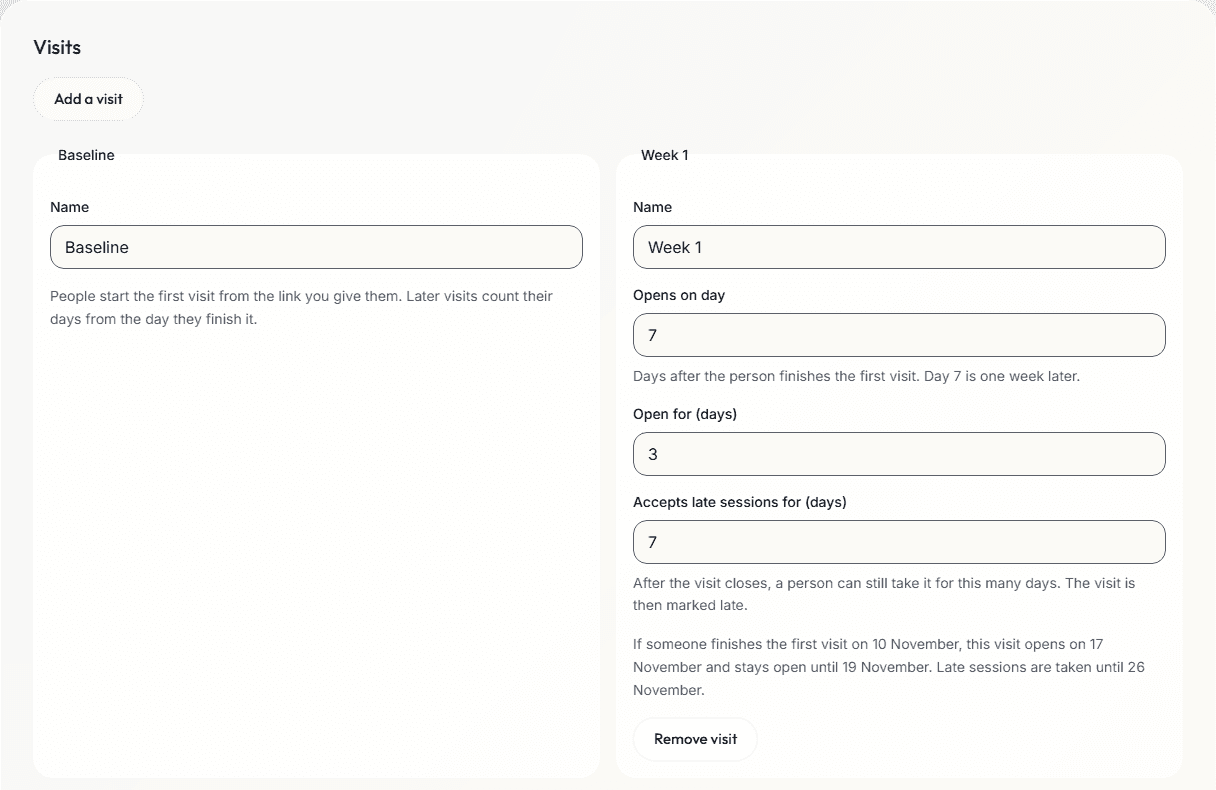
Each visit's window
| Setting | What it sets |
|---|---|
| Name | What the person and the data call the visit, such as Week 1. |
| Opens on day | Days after the person finishes the first visit. Day 7 is one week later. Not used in a study with rounds, where a later round opens when you close the round before. Check still reads it, so keep it filled in and in order, each day no earlier than the round before's day plus its Open for days. |
| Open for (days) | How long the visit stays open. In a study with rounds, it counts from the day you close the round before. |
| Accepts late sessions for (days) | After the visit closes, a person can still take it for this many days. The visit is then marked late. |
Late days end when the next visit opens. Check points out visits with no name, visits out of order and windows that overlap.
The person's side
- After the first visit by link, the person sees a return page: the next visit's dates in their own time zone, their private link and their participant code. A round that has not opened yet has no dates, and the page says so.
- Add to my calendar saves a calendar file with an all-day event for the next visit, once it has dates. It does not name the study.
- The same link opens each later visit when its window opens, on any device.
- When their device is in another time zone, they are asked whether to move the dates of the visits they have not opened.
- Between visits, the same study can ask for daily-life check-ins on their phone. One page shows their visits and check-ins.
Following each visit
- The Participants table has a column for each visit, with its state: After the first visit, Opens, Open until, Late, Done, Skipped or Missed, or Not open yet for a round whose round before is not closed.
- Make a new return link for a person who lost theirs. It is shown once, and the old link stops working at once.
- Move a person's schedule by a number of days, with a reason, for the visits they have not opened, except in a study with rounds. Skip a visit with a reason; it counts as missed.
- Move people to a newer version of the study, with a note, while none of their visits is open and their dates, group and order stay the same.
- Run a returning person's visit in the lab while it is open or late, from Run in the lab or their row in the table. A later round of a study with rounds runs only from the person's own link, which brings the panel's figures.
Studies with rounds
- A study with visits is a study with rounds when its questionnaire has a value from the round before, such as the panel's median rating of a statement. Each visit is then a round, as in a Delphi panel.
- You close each round on the Participants page's Rounds panel, for everyone at once. The Rounds panel shows each round's invited, answered and response. Only the person who made the study can close a round.
- Closing a round freezes its figures from the answers finished when you confirm. People you have excluded are left out of the figures, and excluding or including again after a close does not change them. The close opens the next round for everyone, if there is one, for its Open for days in each person's time zone. It cannot be undone.
- Before the last round, the close form lists the round's comments. A comment is an answer to a Long text question, or to a Short text question that asks for neither an email address nor a set form, in a questionnaire with a value from the round before. The ones you tick are shown in the next round, without the writer's name. Share only comments from questions that told people so.
- Round 1 stays open after its close: people who have not finished it can still finish it, and your link still takes new people, but their answers do not count in its figures. A later round ends when you close it, or when its Open for days and late days run out, whichever comes first. People who have not taken it by then are marked missed, and the round still waits for your close.
- Pilot people have rounds of their own, which you close apart from the study's, and Clear pilot data removes them.
- In a study with rounds, the Participants page gives a round report for the paper, as ACCORD, the reporting guideline for consensus methods, asks. It gives the rounds planned and the stopping rule. For each closed round, it gives the invited, answered and response, each statement's figures and how many rated it, the rules that decide consensus and what the next round asks.
How it works
- Add visits on the builder's Visits tab, and choose which sections run at each.
- Publish, and send the study's link, or run the first visit in the lab.
- Each person's dates count from the day they finish the first visit. In a study with rounds, each later round opens for everyone when you close the round before.
- Follow every visit on the Participants page, and download one export with all of them.
What you get in the data
- visits.csv: a row for each visit of each person, with its state, its dates, whether it was late and the reason for a skip.
- On every session: the visit's name and number, the days since the first visit and whether it was late, for repeated measures analysis.
- For each person: the day they finished the first visit, their time zone, the visits done and skipped, and how often their schedule moved.
Limits
- ConductExperience sends no reminder for a visit. Give people their return link and dates yourself, by email or text.
- A person seen in the lab gets a return link when you make one for them.
- Later visits are run and managed by the person who made the study. Team members see every visit.
- A missed visit cannot be opened again. The calendar file holds the next visit only.
- With a recruitment panel, the completion code comes after the last visit, and only when every visit was finished.
Related
Daily-life check-ins
EMA on the person's phone between visits, in the same study.
Study builder
The parts, groups, orders and versions of the study each visit runs.
Online studies
The first visit by link, from a panel or a mailing list.
Survey software
The questionnaires each visit asks, with rules, scores and languages.
Planning a study?
Start one now, or tell us what you want to measure.