Open a .qsf survey file
A .qsf file is the survey file Qualtrics exports. Bring one into a study and read a report of what came over, what changed and what did not, before anything is added.
98%
of the questions came over
1,599 of 1,628 questions in 26 public Qualtrics survey files
How it works
- Export the survey as a .qsf file from your own Qualtrics account.
- Start a study and choose Open a survey file (.qsf). In a study you have, add a questionnaire part and choose From a file.
- Read the report: what came over, what changed and what did not, each with a note. Then make a study from it or add it to the part, or cancel and nothing changes.
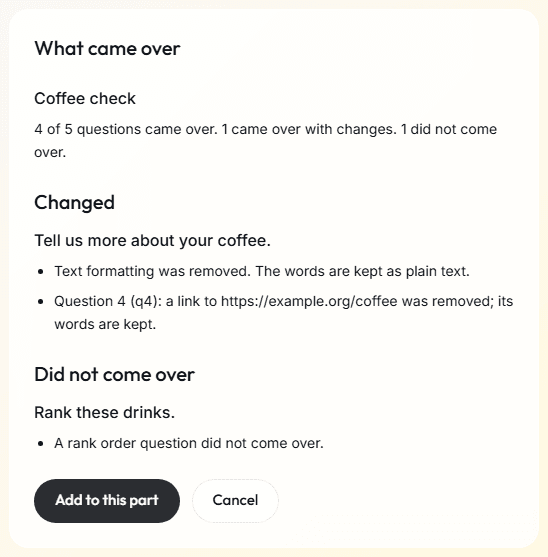
What comes over
| In the survey file | In the questionnaire |
|---|---|
| Multiple choice, one answer or several | A single or multiple choice question |
| A multiple choice's least and most number of choices | The same least and most, when its choices allow them |
| An exclusive choice of a multiple choice, such as None of these | A choice that goes alone: it can only be chosen on its own |
| Multiple choice whose every choice is a picture | An image choice question. The pictures do not come over: pick the study's own |
| A heat map, or a hot spot question that turns areas on or off | A click question. The picture does not come over: pick the study's own |
| A file upload question | A file question, which takes a photo or a PDF file |
| Text entry, one line or several | A short or long text question, or a number question when the box takes only numbers |
| An email check on a one-line text box | A short text question that checks for an email address |
| A form of several text boxes | A short text or number question for each box |
| A Likert grid, one answer for each row | A grid question with the same rows and answers |
| A Likert grid, several answers for each row | One multiple choice question for each row |
| A rank order question | A ranking question |
| A constant sum question | A constant sum question, with its total |
| A horizontal slider or bar | A slider |
| Text and graphic | Instructions |
| A display rule | A rule, when it compares earlier answers in a way the editor can write |
| Piped text from an earlier question | Piped text that shows that question's answer |
| Questions in a random order within a block | A screen with its questions in a random order |
| A skip to the end of the survey | A rule that ends the questionnaire early |
| A branch whose condition compares earlier answers or values in a way the editor can write | A rule on each question in its blocks, and its end of survey, when it is the last thing in the branch, as a rule that ends the questionnaire early |
| A randomizer of blocks, or of groups of blocks, that shows a set number of them | N of these at random: each person sees that many, drawn at random and shown in a random order. Where the original showed each one equally often, the counts here can differ |
| A matrix or choice question that offers the choices chosen in an earlier multiple choice | A grid or choice question that offers only the options chosen there |
| A loop and merge over a fixed list of rows, showing every row in order or a set number of rows at random, when its block's questions can repeat here | A list of the same rows, and screens that repeat once for each row, or for that many rows drawn at random. The questions show each row's fields where the original survey filled them in |
| An embedded data field that the link fills in, or that the flow sets once to a fixed text, outside a randomizer or a branch | A value from the link, or a worked-out value that holds the text. The report says how the link names each value from the link, such as ?condition= |
| A randomizer that shows one of its elements, each setting the same field to a different text | A value from the group: the name of the person's group in the study. The report says to give the study one group for each text, such as A and B |
| A display rule or piped text on an embedded data field that came over | A rule, when it checks that the field equals a text or is not empty, and piped text that shows the value, or nothing when it is blank |
| A timing question with a minimum time or an auto-advance, whose times are whole seconds up to 600, on a screen with something else on it | A timer on its screen, one for each screen: a person can go on only after the minimum, or the screen moves on by itself after the auto-advance. With both, the auto-advance comes over |
| Other timing questions, and meta info questions | Nothing: there is nothing to answer |
What is left out
| In the survey file | What happens |
|---|---|
| Custom code | It does not run here. |
| A web service call | No outside service is called. |
| Quotas | People a quota would have stopped can take part. You can add your own quota to a link study's screener. |
| Scoring | The questionnaire has no scores until you add them. |
| Translations | Only the original language is kept. |
| A constant sum with no whole-number total | The question is left out. |
| A grid's own names for its rows | Rows are named by their position. |
| A text box inside a grid | The grid comes over without it. |
| Any other branch or randomizer | Its blocks run for everyone, in the order listed, and its endings do not apply. The report says how many did not come over. |
| Any other loop and merge, such as a loop over the choices of a question, a loop whose block holds a multiple choice, or one with more than 20 rows to show | Its block's questions run once. |
| An end of survey's own message, web address or mark on the response | The questionnaire ends with its own end and keeps the answers given. |
| A picture or file attached to a question's text | The question comes over without it. |
| Any other embedded data field, such as one set in a branch, set more than once, set by the survey's JavaScript, or named like a personal detail such as Email | It does not come over, and the report names it. |
The report has a note for each one, on the question it affects.
Limits
- Your file will differ from the 26 we tested. The report says what happened to yours.
- A .qsf file holds no responses, so none come over.
- The reader runs no code from the file, fetches nothing and calls no outside service.
- Up to 10 values from the link are kept for each person. With more, the report names the ones after the first 10, which stay blank.
Related
Survey software
The question types, rules, scores and languages of the questionnaire editor.
Daily-life check-ins
EMA: short questionnaires on the person's phone, at fixed or random times or when something happens.
Measures
Cognitive tests, face and gaze, and stimuli and events, on the same clock as the answers.
Pricing
Free for pilots and teaching. No charge for each question or answer.
Planning a study?
Start one now, or tell us what you want to measure.