Build a study part by part
The study builder puts questionnaires, cognitive tests, images and video, instructions and breaks into one study, with groups to compare and orders to balance.
Check it, preview it as a participant and publish a numbered version. Then run it in the lab, by link, on tablets or as check-ins on people's phones.
12
groups in a study
assigned balanced, at random or by weight
25
people on a study's team
as viewers, editors and owners
11
templates to start from
Survey, A published scale, Delphi panel, Morning and evening diary, Five check-ins a day, Symptom log, Classic test with face, Association test with ratings, Pack or shelf test, Ad or concept test and Tasting
The builder's tabs
| Tab | What you set there |
|---|---|
| Parts | The parts of a session, in sections: images or video, a questionnaire, a test, instructions or a break. Each part's Run when and End the study after this part when, and each section's Each person sees. |
| Groups and order | Groups to compare, each with a weight and a limit. Sections in a fixed or counterbalanced order, and the parts of each section fixed, shuffled for each person or counterbalanced. |
| Samples | Foods or drinks under three-digit codes, and their serving orders. |
| Visits | Later visits inside windows you set, and which sections run at each. |
| Daily life | Check-ins on the person's own phone, after the first session. |
| Settings | The consent text, the end message, the camera (off, face, or face and gaze) and event markers. |
| Check | Each problem as a plain sentence, with a button that goes to it. |
Groups and orders
Each person joins one group. A group can have a limit, the most people it takes. With two or more groups, choose how people are assigned:
| Assignment | What it does |
|---|---|
| Balanced | Keeps the groups in proportion to their weights, from the people in each group now. |
| Random | Gives each person an equal chance of each group. |
| Weighted | Gives each person a chance of each group in proportion to its weight. |
Counterbalanced orders use a balanced Latin square, so each section or part comes first, last and after every other one equally often.
A section's Each person sees can show each person some of its parts, drawn at random once and kept when the person comes back and at each visit, in the section's order. The draw is not balanced across people: a study that needs balance uses groups.
Counterbalancing, with a generator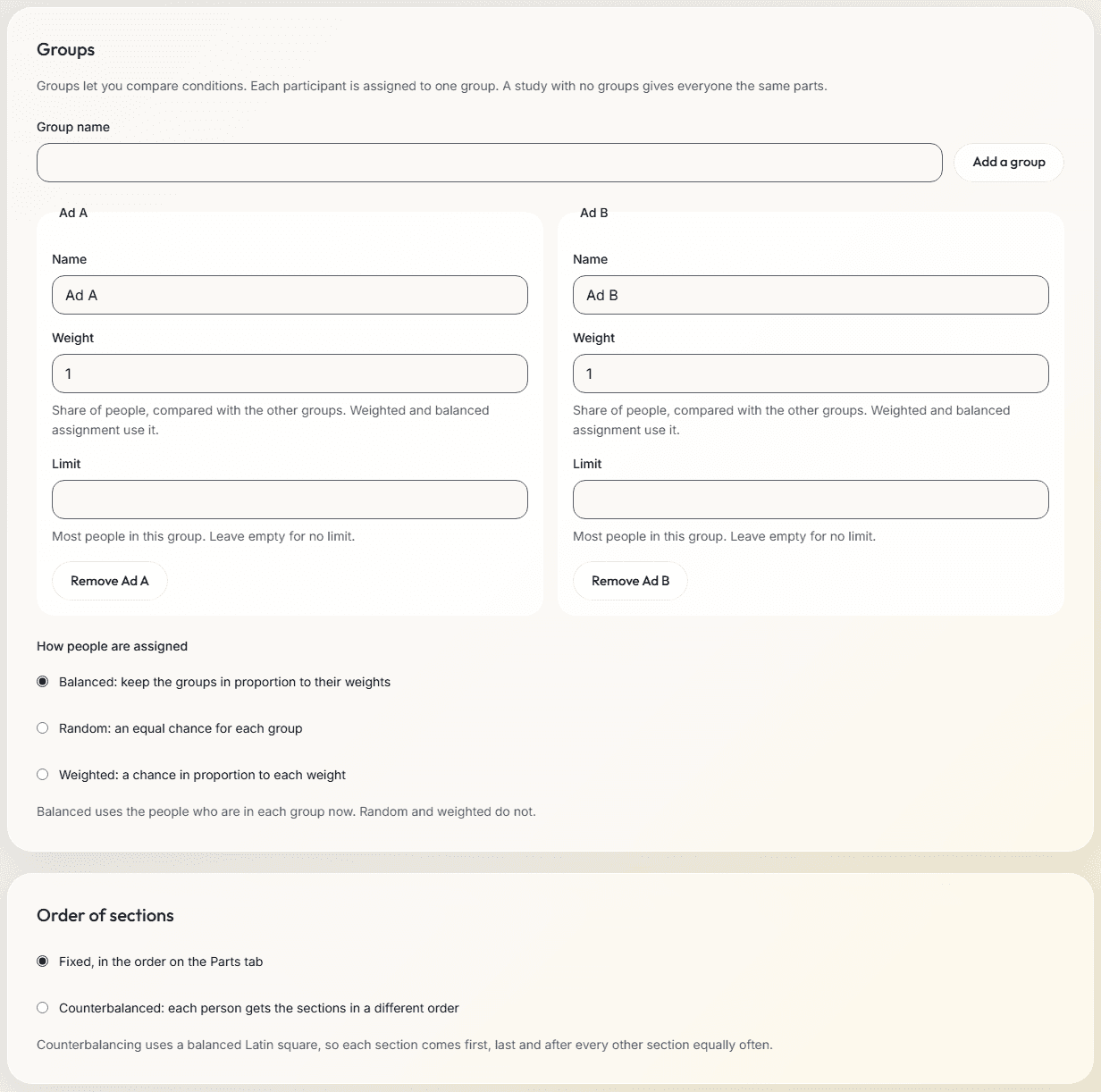
Rules on parts
- A part can run only when a rule holds (Run when), and the study can end after a part, as finished, when a rule holds (End the study after this part when). A rule reads the questionnaire parts every person sees before the part, values from the link and the person's group, and End the study after this part when can read the part itself too. In a study with later visits or check-ins, the session ends there instead, and they go on as planned.
- A part whose Run when does not hold is passed over, and events.csv logs part_skipped, with the part in its step_id column.
- A screener runs for everyone, so it has no Run when.
- Check stops a rule that reads a part some people may not have finished by then, and Preview follows the rules for the group you preview.
Check, preview and publish
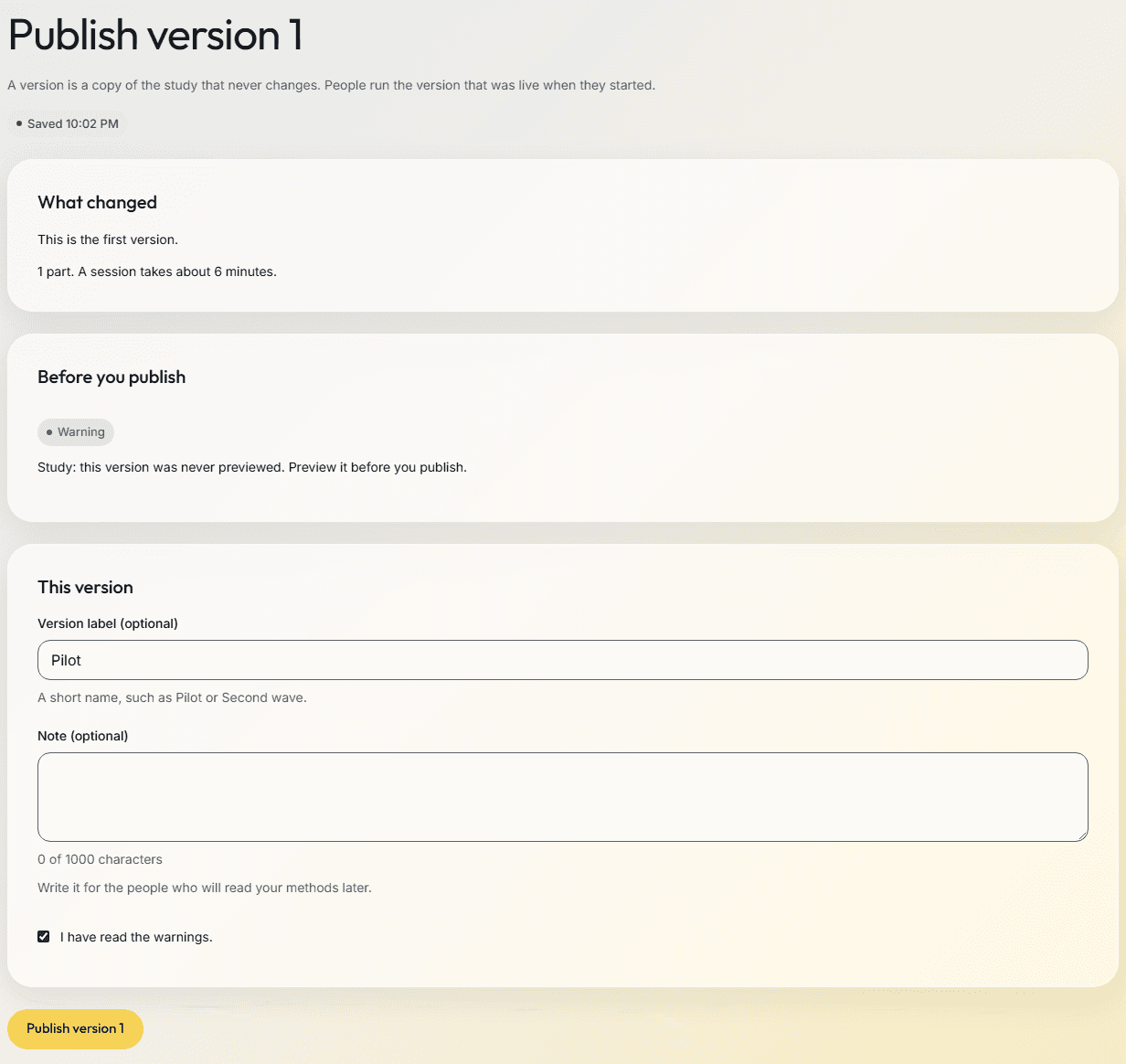
- Check lists every problem and warning. A problem stops publishing until you fix it; a warning has to be marked as read. Pilot it yourself publishes a version that was not previewed, or whose consent names no contact, because the pilot is where you try it.
- Preview runs the draft as a participant sees it, in the group and order you choose. Nothing is saved, and the camera is not used.
- Publish makes a numbered version that never changes, with a label and a note for your methods. From version 2, the screen lists what changed since the last one.
- People run the version that was live when they started. Versions shows each version's note, when it was live and who ran it, and sets the version new participants get.
A study's states
| State | What happens |
|---|---|
| Draft | You build and preview. No one can take part yet. |
| Pilot | Pilot links and lab sessions run the latest version. Their data is marked as pilot data, and an owner can clear it. |
| Live | Links run the live version and lab sessions are real. You can keep editing the draft and publish a new version. |
| Paused | No one new can start. People who already started can still send their answers. |
| Completed | The study is closed. Sessions under way can arrive for 24 hours. |
| Archived | Kept with its data, out of the way. It can be restored to Completed. |
In the lab
- Lab mode runs a pilot or live study on one computer, one participant after another.
- Start shows the hand-over screen with the person's code, group, order and version. Hand over the computer; at the end, choose Next participant.
- The Participants table lists each person's code, status, how they took part, group, order, start time, length, data quality and version, with a link to their data.
- The study's page shows how many people each group holds, beside the share it aims at.
After people start
- The list of your studies shows how many people finished since your last visit in this browser.
- A completed study's page leads with Download the data and See results, and shows the study in figures: the people who finished, the people who ended early, the versions and the days from the first session to the last.
- Duplicate study makes a new draft from a study you made. On a completed study it is called Run it again as a new study.
Working as a team
- Share a study with up to 25 people as viewers, editors or owners. The person who made it is always an owner.
- An invitation is a link with a code in it. It is shown once, works once and closes after 7 days.
- Activity shows who on the team changed what and in which version, and who excluded or included a person.
Templates
Open an example study of 48 made-up people, with its Results page and a real download, before you build your own.
| Template | What it is for |
|---|---|
| Survey | Ask people a few questions, with a rule that shows a question only when it applies. |
| A published scale | Ask a published scale in its holder's wording, scored the way they published it. |
| Delphi panel | Rate statements over rounds with an expert panel, who see the group's ratings between rounds and can change theirs. |
| Morning and evening diary | A diary on the person's own phone: how they slept each morning, and their day each evening. |
| Five check-ins a day | Short check-ins on the person's own phone at times they cannot predict: mood, stress, place and company. |
| Symptom log | People log a symptom on their own phone when it starts, with an evening check for anything missed. |
| Classic test with face | Run a classic test and record the face while people do it. |
| Association test with ratings | Measure an association with a timed sorting test, and ask for the same attitude in words. |
| Pack or shelf test | See how people look at product packs, and how much they like each one. |
| Ad or concept test | Compare two ads or concepts. Each person sees one of them. |
| Tasting | Compare samples that people taste, such as foods or drinks, on a tablet in a booth. |
How it works
- Start a study from a template, or from nothing.
- Add its parts in sections, then the groups, orders, samples, visits or check-ins your design needs.
- Run Check, and preview the study as a participant.
- Publish version 1. Try it as a pilot, then launch it.
- Run it in the lab, by link, on tablets or as check-ins, and follow each person on the Participants page.
Limits
- A study can run these cognitive tests: Implicit Association Test (IAT), Stroop Color-Word Test, Go/No-Go Task and Decoy Choice Task. The association test's words and images are fixed.
- Images and video are kept in the account of the person who made the study: up to 500 MB a file and 2,048 MB a study. Other team members upload files of up to 8 MiB.
- Researcher screens are in English.
Related
Online studies
Send a link to a panel or a mailing list. People take part on their own computer or phone.
Sensory testing
Coded samples, balanced serving orders and a staff PIN, on tablets in booths.
Longitudinal studies
Later visits inside windows you set, each person with a private return link.
Survey software
The question types, rules, scores and languages of the questionnaire editor.
Planning a study?
Start one now, or tell us what you want to measure.